Rafara Wedding Googleslide Templates: Elegant Design for Your Big Day
Planning a wedding involves a thousand details, from the venue and the flowers to the guest list and the vows. When it comes to presenting those details—whether for your wedding party, vendors, or as part of the celebration itself—a polished, cohesive visual presentation can make a world of difference. This is where a dedicated template like Rafara - Wedding Googleslide Templates steps in, moving beyond generic slides to offer a purpose-built tool for one of life's most significant events.
More Than Just Slides: A Cohesive Visual Story
At its core, Rafara is a presentation toolkit designed with the romance, elegance, and personal narrative of a wedding in mind. It’s not merely a collection of slide layouts; it’s a visual framework for telling your story. The style leans into a clean, modern aesthetic with a touch of classic sophistication. Think soft, neutral color palettes that can be easily adjusted to match your wedding theme, ample white space to let your content breathe, and a thoughtful use of typography that balances elegance with clarity. The personality of the template is one of understated grace—professional enough for vendor meetings yet personal enough to feel heartfelt.
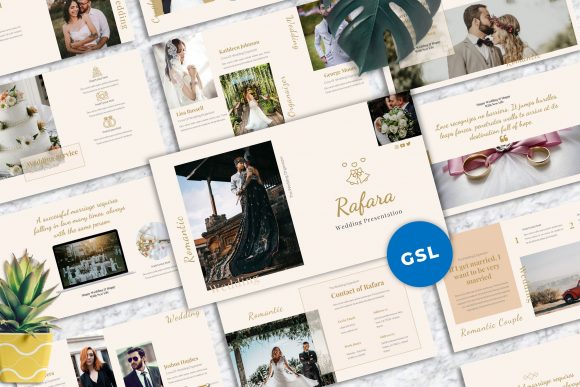
The real value lies in its practical design features. With 40 master slide layouts, you have a comprehensive starting point for every conceivable need. This isn't just about title slides and bullet points. You’ll find dedicated layouts for timelines, photo collages, venue comparisons, budget breakdowns, wedding party introductions, and even thank-you messages. The 16:9 widescreen ratio ensures your presentation looks full and modern on any screen, from a laptop to a projected display at a rehearsal dinner.
Practical Applications for the Wedding Journey
The utility of Rafara extends across the entire wedding planning process. For the couple, it becomes an organizational hub. Imagine using it to create a visual mood board for your florist or photographer, with drag and drop image placeholders making it simple to swap in inspiration pictures. The easy color change feature means you can align every slide with your exact wedding palette, ensuring consistency from your planning documents to your day-of signage.
For wedding planners and vendors, this template is a professional asset. It can be used to pitch ideas to clients, present venue options, or showcase portfolio pieces in a format that feels tailored to the industry. The professionally designed slides with a strong focus on typography and usability mean you spend less time fighting with formatting and more time on strategy and content. The inclusion of vector based icons and unique mockup devices (like phone or tablet frames) allows you to present digital concepts, like a wedding website or app, in a polished, contextual way.
Beyond the planning phase, the presentation can be repurposed for the event itself. Use it to create a beautiful slideshow of your relationship journey for the engagement party, a detailed itinerary for the wedding weekend shared with guests, or a heartfelt tribute to family members during the reception. The picture placeholder functionality makes building these visual narratives intuitive, even for those with minimal design experience.
Design Details That Make a Difference
What sets a premium template apart from a basic one is often in the details, and Rafara appears to have been made very carefully with attention to detail. The use of recommended free web fonts is a practical touch, ensuring your presentation will look consistent without needing to purchase additional typeface licenses. This consideration for real-world use—where budgets and access matter—is a mark of thoughtful design.
The all graphics resizable and editable nature of the assets means you are never locked into a rigid design. If a decorative element doesn’t suit your taste, you can adjust its size, color, or remove it entirely. This flexibility is crucial for personalizing a template to reflect your unique brand identity, even if that brand is simply your personal wedding style. The promise of free support also adds a layer of security, knowing that help is available if you encounter a technical hurdle.
Choosing and Using the Template Effectively
When integrating a template like Rafara into your workflow, a bit of strategic thinking goes a long way. Start by evaluating the core layouts. Does the style of the serif font headings and the sans serif font body text align with the tone of your event? A template with a strong script font accent might feel more formal, while one relying on clean modern typography could suit a contemporary, minimalist wedding.
Test the font pairing options. The template likely suggests combinations, but don’t be afraid to experiment. For instance, you might pair the elegant serif used for titles with a simple, highly readable sans serif for body text in your budget slides. The goal is readability and a clear visual hierarchy—your guests should be able to follow a timeline slide as easily as your planner can read a vendor list.
Finally, remember that the images in the demo are for preview only. The true power of the template is unlocked when you fill it with your own photos, your chosen colors, and your specific text. It provides the professional structure and design assets, but the story is yours to tell. By leveraging its organized layouts and customizable features, you can create a presentation that not only conveys information but also enhances the joy and beauty of your wedding journey.