Master Your Sign Business with This Editable Canva Template
Running a custom sign business involves more than just artistic skill; it demands precision, organization, and professional communication. If you have ever felt overwhelmed by scattered customer notes or inconsistent invoicing, the Editable Sign Order Form Canva Template is the solution you need. This digital asset is not just a static PDF; it is a fully customizable suite of documents designed to streamline your workflow and elevate your brand identity. Whether you are a seasoned entrepreneur or a hobbyist turning your craft into a side hustle, managing the administrative side of design work is crucial for growth.
A Complete Business Tracker System
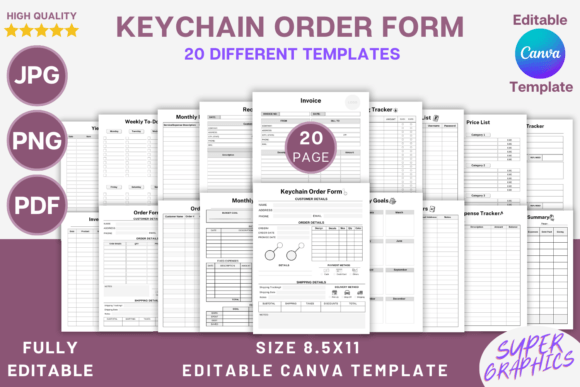
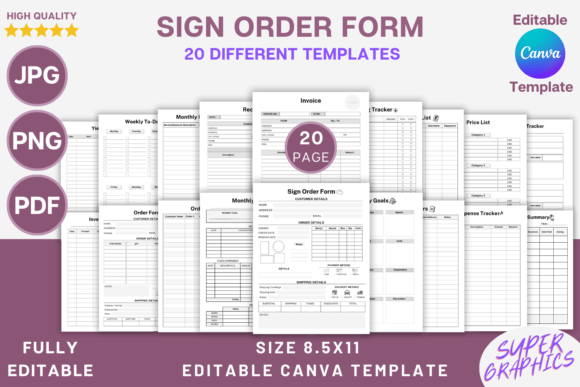
What makes this package stand out is its comprehensive nature. You are not just receiving a single order form; you are getting a robust business management system. The kit includes over 20 different templates, covering everything from the initial customer inquiry to the final financial summary. You will find dedicated sheets for Inventory, Monthly Budgets, Expense Tracking, and even a Yield Tracker—perfect for those working with vinyl or substrate materials where waste management matters.
The core of the product, the Editable Sign Order Form, allows you to capture specific customer details with clarity. Unlike generic forms, this template is tailored for the signage industry. It provides ample space for dimensions, material choices, and design specifications. Paired with the Invoice and Receipt templates, you can maintain a consistent brand identity across every client touchpoint. When your internal documents look as polished as your external marketing, it signals a level of professionalism that builds immediate trust with clients.
Customization Without Limits
The true power of this Canva template lies in its editability. Canva is known for its user-friendly interface, making modern typography accessible to everyone. You do not need to be a graphic designer to make these forms look custom-built for your shop. You can easily swap out fonts to match your existing logo design or adjust the color palette to reflect your brand’s personality.
Think of the template as a structural foundation. You have the freedom to add lines, checkboxes, or squares to fit your specific data collection needs. Need to track specific design styles? Add a checkbox for "Rustic," "Modern," or "Script Font" styles. The flexibility allows you to create a system that works exactly the way you do, rather than forcing your process into a rigid, pre-made structure. This level of customization ensures that your documents feel like an integral part of your design assets, not an afterthought.
Enhancing Professionalism and Efficiency
In the world of creative font usage and design, consistency is king. When you send a client a beautifully designed PDF invoice or a clear, organized order form, it reinforces your reputation. This template bundle includes high-resolution 300 DPI files in PDF, JPG, and PNG formats, ensuring that your printed documents are crisp and your digital files are sharp. The 8.5x11-inch trim size makes it perfect for standard printing, whether you are using a home office printer or sending files to a professional print shop.
Furthermore, the inclusion of a Resource List and Price List templates allows you to standardize your offerings. This eliminates the back-and-forth of quoting prices on the fly. By having a pre-set, visually appealing price list, you streamline the sales process. This approach mirrors the principles of good editorial design—presenting information in a hierarchy that is easy to scan and understand. It reduces cognitive load for your clients, making it easier for them to say "yes" to your proposal.
Practical Application for Modern Creators
This tool is designed for the realities of modern business. Whether you are selling on Etsy, at local craft fairs, or operating a commercial shop, organization is the key to scaling. The Order Tracker and Weekly To-Do List help you visualize your workload, ensuring you never miss a deadline. For those involved in packaging design or web design, these principles of tracking and organization are universal, but for sign makers, where physical production is involved, inventory and yield tracking are vital.
By integrating these templates into your daily routine, you transform your business from a chaotic creative endeavor into a streamlined operation. The ability to download and immediately edit these files means you can modernize your paperwork in minutes. It is an investment in your operational infrastructure that pays dividends in saved time, reduced errors, and a more professional appearance. Elevate your workflow today and focus on what you do best: creating beautiful, custom signs.