Crawfish Stitch Canva Frame Template: A Crafter's Digital Toolkit
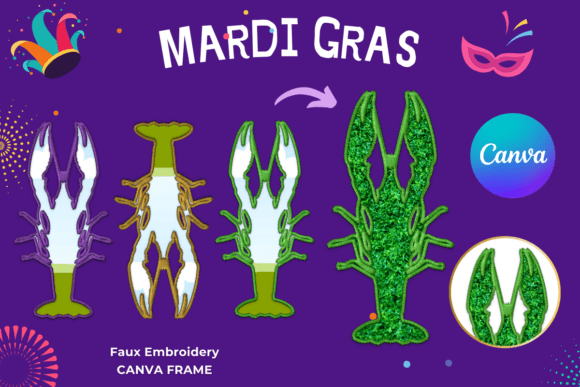
There's a certain texture that digital designs often miss—the cozy, handmade feel of a stitched border or a crafted edge. If you've ever wanted to add that tactile, artisan quality to your graphics without spending hours at a sewing machine or wrestling with complex design software, the Crawfish Stitch Canva Frame Template is a tool built for you. This isn't just another static graphic; it's a dynamic, editable canvas that brings the charm of stitched art into the modern digital workspace.
Understanding the Digital File: What You're Actually Getting
First, let's clear up a common point of confusion. This is a digital file, not a physical product. You won't receive a printed frame or any props. What lands in your inbox is a single PDF file. Inside that PDF is a unique link that grants you access to one custom-made Canva frame template. Think of it as a key to a very specific, very useful design tool hosted within Canva itself.
The template is set up for a standard 12×12 inch paper size, a popular dimension for scrapbooking, card making, and social media square posts. However, one of its greatest strengths is flexibility. Because it's an editable Canva frame template, you can easily size it up or down to fit your project's needs. Need a smaller frame for a thank-you card? Shrink it. Want a larger centerpiece for a poster? Scale it up. The approximate sizing is your starting point, not your limit.
A crucial detail to note: this is not a PNG or SVG file. Those are static image formats. This is an editable Canva template, which means you have direct control within Canva's user-friendly platform. You can drag and drop your own photos, change colors, add text, and manipulate the elements. The template features a transparent layer, which is a designer's best friend. It means the stitch frame will sit cleanly over your images or backgrounds without any awkward white boxes, making it perfect for vinyl sublimation projects where clean edges are non-negotiable.
Where This Stitch Template Truly Shines
The Crawfish Stitch Canva Frame Template isn't trying to be a minimalist sans-serif font or a sleek logo element. Its personality is warm, rustic, and playful. It evokes a sense of handmade craft, Southern charm, and cozy authenticity. This makes it a powerful design asset for specific projects where that emotional connection is key.
For small business owners and entrepreneurs in the food industry, especially those with Cajun, Creole, or Southern-themed brands, this template is gold. Use it to frame your product photos, create eye-catching social media graphics for a crawfish boil event, or design a menu board with genuine character. It instantly communicates a down-home, authentic vibe that generic stock frames can't match.
Crafters and hobbyists will find endless uses. Frame a cherished family photo for a digital scrapbook page, create a unique border for a printable quote, or design a one-of-a-kind invitation for a backyard party. The stitch effect adds a layer of texture and interest that elevates a simple design into something special. For bloggers and content creators, it can be the perfect accent for a "How-To" post, a recipe graphic, or a lifestyle photo that needs a touch of whimsy without overwhelming the main content.
Practical Guidance for Using Your Canva Frame
Getting the most out of this template involves a few practical steps. Once you've accessed the template via the link in your PDF, you're working directly in Canva. This is where the easy drag & drop functionality comes into play. You can upload your own images and place them within the stitch frame, or use Canva's vast library of stock photos and elements as your background.
Think about visual hierarchy. The stitch frame is a bold, decorative element. It naturally draws the eye. Use it to highlight the most important part of your design—a product, a person, or a key message. Pair it with clean, simple typography. A sans serif font or a clean serif font for your body text will balance the ornate frame, ensuring your message remains readable. Avoid using overly decorative script fonts or handwritten fonts for large blocks of text, as this can create visual clutter.
Color is another lever you can pull. While the template has a default stitch color, you can often adjust this within Canva to match your brand identity. Consider the context. A red stitch on a white background feels patriotic and bold. A cream stitch on a kraft paper background feels earthy and organic. Test different combinations to see what resonates with your project's tone.
Finally, remember the commercial aspect. If you're using this for a client project, a product for sale, or marketing materials, ensure you understand the licensing. Since this is a premium custom template, the license typically covers both personal and commercial use, but it's always wise to review the specific terms provided by the creator. This allows you to build a consistent brand identity across your digital and print materials, from your website to your packaging, using this distinctive stitch motif.
The Crawfish Stitch Canva Frame Template is more than a pretty border. It's a specialized tool that solves a specific design need: adding authentic, textured, handmade charm to digital projects with ease. By understanding its format, strengths, and best practices for use, you can leverage it to create more engaging, professional, and emotionally resonant designs that stand out in a crowded digital landscape.