Canva Notebook & Journal Cover15: Your Creative Starting Point
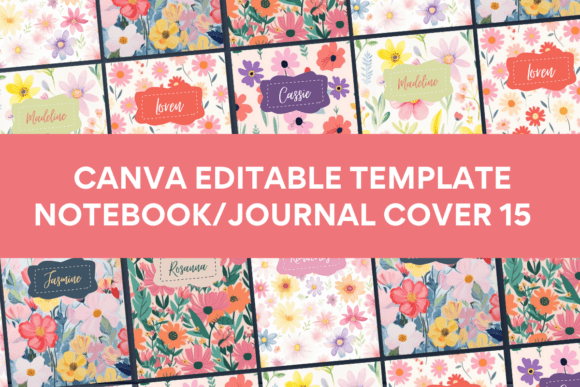
That moment when you have a brilliant idea for a journal, planner, or notebook but the thought of designing a cover from scratch feels overwhelming? It’s a common hurdle for entrepreneurs, creators, and hobbyists alike. The Canva Template Notebook/Journal Cover15 is built precisely for that moment. It’s not just a collection of pretty graphics; it’s a practical design asset engineered to bridge the gap between your concept and a polished, print-ready product. This template pack provides ten distinct, ready-to-edit front cover designs, each sized at a standard 8 x 11 inches, giving you a professional foundation without the professional design software learning curve.
More Than a Template: A Design System with Unique Style
What sets the Canva Template Notebook/Journal Cover15 apart in a sea of Canva templates is its curated visual identity. The majority of the illustrations, design elements, photos, and backgrounds are sourced outside of Canva’s standard library. This is a critical detail. It means you’re starting with a design that has inherent uniqueness, reducing the risk of your final product looking like a generic template thousands of others might be using. The overall appeal leans towards a clean, modern aesthetic with enough personality to stand out, yet remains versatile enough to be adapted for various niches—from minimalist planners to vibrant creative journals.
The style strikes a balance between professionalism and approachable creativity. You’ll find layouts that guide the eye effectively, establishing a clear visual hierarchy that makes titles and subtitles readable. The included design elements—from subtle textures to illustrative accents—act as a cohesive design system. This allows you to maintain brand identity and consistency if you’re creating a series of notebooks or planners for your business. For a small business owner in the print-on-demand space, this isn’t just a time-saver; it’s a quality booster that elevates your product’s perceived value from the start.
Practical Applications: From Personal Project to Commercial Product
The true strength of a resource like the Canva Template Notebook/Journal Cover15 lies in its flexibility. Its applications span a wide range of real-world projects.
- For Small Business & Print Entrepreneurs: This is where the template shines. You can rapidly prototype and produce custom notebooks, gratitude journals, or branded planners for your clients or your own product line. The commercial-friendly license (once you’ve customized it significantly) means you can sell the final printed product. Imagine creating a bespoke journal for a yoga studio or a series of recipe notebooks for a food blogger—this template accelerates the packaging design phase dramatically.
- For Personal Use & Hobbyists: Create personalized gifts, design a journal for your own creative writing, or build a custom planner tailored to your workflow. The ease of editing on a mobile phone means you can tweak designs during a commute or in a coffee shop, making the creative process seamlessly fit into your life.
- For Content Creators & Marketers: Use the covers as part of a larger brand identity system. They can inspire social media graphics, lead magnet designs, or branded content upgrades. A well-designed journal cover can become a recognizable visual element across your web design and digital presence.
The key is to treat the Canva Template Notebook/Journal Cover15 as a starting framework, not a finished product. Swap out the placeholder text with your title. Change the color palette to match your brand. Replace one of the unique background textures with your own photography or illustration. The template’s structure ensures that even these modifications result in a balanced, professional layout, saving you from the pitfalls of poor alignment or cluttered composition.
Working with the Template: Practical Guidance for Best Results
Getting the most out of this asset requires a thoughtful approach. Here’s how to ensure your final design is effective and polished.
- Evaluate the Fit: Before you dive in, look at the ten designs. Which one’s personality aligns with your project’s tone? A serene, watercolor-style cover might be perfect for a mindfulness journal but less suited for a high-energy fitness planner. Select the design that serves as the best visual shorthand for your content.
- Font Pairing is Crucial: The templates come with pre-selected fonts, which are part of the design’s charm. However, if you change the title, ensure your new font pairing is harmonious. If the template uses a serif font for elegance, pairing it with a clean sans serif font for subtitles usually works well. Avoid using two highly decorative fonts together, as it can create visual noise and harm readability.
- Test for Readability: Zoom out on your design. Can you read the main title from a thumbnail size? This is vital for online marketplaces where your product image is small. Ensure there is sufficient contrast between text and background. The templates are designed with this in mind, but if you change background images, double-check this principle.
- Leverage the Included Styles: Don’t just use one design and ignore the others. The ten designs in the Canva Template Notebook/Journal Cover15 pack can serve as a style guide. You might use one cover for a journal, adapt another’s color scheme for a planner, and use a third’s illustrative style for matching social media posts, creating a cohesive collection.
Remember, the PDF you receive includes a direct link and clear instructions. You do not need a Canva Pro account. The free plan is entirely sufficient, which removes a significant barrier to entry for many starters and beginners. The ability to edit on mobile also democratizes the design process, allowing for quick iterations without being tied to a desktop computer.
A Final Note on Process
Approach the Canva Template Notebook/Journal Cover15 as a collaborative tool. It brings professional layout and unique assets to the table; you bring the unique idea, the specific text, and the final brand touches. By focusing on customization—swapping elements, adjusting colors, and refining text—you transform a ready-made template into a genuine design asset that reflects your vision. It’s a practical solution for anyone who values their time but refuses to compromise on the quality and uniqueness of their creative output.